Restaurant Staff Scheduling in Singapore: What to Check Before You Publish a Roster
By Alex · Founder, MakanCloud · 11 October 2026
Labour is the cost a Singapore restaurant can least afford to get wrong, and on 1 July 2026 the food services Progressive Wage Model (PWM) moved its wage floors up again. You cannot negotiate the floors. What you can control is the roster: how many hours you schedule, how many of them turn into overtime, and how often someone gets called in on a rest day.
Most rostering mistakes are not dramatic. A cook is put on two outlets at once. A part-timer drifts past their hours. A rest day gets swapped away in the second week and nobody notices until payroll. Each one costs money or goodwill, and most can be caught before the roster goes out.
This guide covers the rules a roster in Singapore has to live with, a checklist to run before you publish, what to ask when you compare scheduling software, and how MakanCloud handles it. The rules below are summarised from the Ministry of Manpower (MOM) website as checked on 11 October 2026. MOM's current pages are the authority, and this is not legal or payroll advice; check your own contracts with MOM or a professional adviser.
The rules your roster has to respect
Employment Act, Part 4
Part 4 covers non-workmen earning a basic monthly salary of up to S$2,600 and workmen (mainly manual work) earning up to S$4,500. Most kitchen, counter and floor staff fall inside it. For those employees:
- Normal hours: up to 44 hours a week. If they work more than 5 days a week, up to 8 hours a day; 5 days or less, up to 9 hours a day.
- Breaks: generally no more than 6 consecutive hours without a break.
- Overtime: at least 1.5 times the hourly basic rate, paid within 14 days of the end of the salary period. The hourly basic rate for a monthly-rated employee is (12 × monthly basic salary) ÷ (52 × 44).
- Limits: no more than 12 hours of work a day, and no more than 72 overtime hours a month, unless MOM grants an exemption.
- Rest days: 1 rest day a week, and no more than 12 days between two rest days. If the rest day is not a Sunday, the employer should prepare a monthly roster and tell staff their rest days before the month starts.
- Working on a rest day at the employer's request costs 1 day's salary for up to half the normal daily hours, and 2 days' salary for more than half.
- Public holidays: 11 paid public holidays a year. Working on one means an extra day's pay by default, or a substitute day off by mutual agreement.
Part-time employees are those contracted for less than 35 hours a week. They are covered by the Employment Act too, with their own rules for leave, overtime and rest days.
Food services PWM (1 July 2026 to 30 June 2027)
PWM applies to Singapore citizen and permanent resident employees working in premises with an SFA food retail or central kitchen licence, at firms that employ foreign workers. Employers that do not meet it cannot renew or apply for work passes. The floors are monthly gross wages for full-time work, excluding overtime:
- Category A (quick service: fast-food outlets, food courts, kiosks, eating houses where customers self-collect): Cook (QS) S$2,470; Kitchen assistant / Food service counter attendant S$2,295; Food / drink stall assistant S$2,220.
- Category B (full-service restaurants with wait staff, caterers, central kitchens): Cook (FS) S$2,520; Kitchen assistant (FS) S$2,320; Waiter S$2,320; Waiter supervisor S$2,875.
- Senior cooks and managers are left to market rates.
Part-time floors are pro-rated on a 44-hour week, for example S$12.04 an hour for a Category A kitchen assistant. The schedule is already published to 2029: most roles rise by another S$140 on 1 July 2027 and again on 1 July 2028. Employees covered by Part 4 who work more than 44 hours a week also have to meet MOM's separate overtime gross wage table. See MOM's food services PWM page for the full tables.
A checklist to run before you publish a roster
Whatever tool you use, a roster for a Singapore restaurant should pass these checks before staff see it:
- Skill cover: every shift and station is filled by someone who can actually do that job.
- No double booking: nobody is on two shifts at the same time, including shifts that run past midnight and shifts at another outlet.
- Leave respected: nobody is rostered on a day they have approved leave.
- Minimum headcount: each station meets its minimum for each shift, and you know where you are running at the minimum rather than the target.
- Rest days: every full-timer gets the rest days their contract and Part 4 require, with no more than 12 days between them.
- Hours and overtime: weekly hours and planned overtime are within the limits, and overtime you are going to pay for is planned rather than discovered at month end.
- Part-timer caps: part-timers stay within the hours you agreed with them.
- Public holidays: anyone working a public holiday is flagged, so the extra day's pay or day off in lieu is not forgotten.
- Changes after publishing: shift swaps and late leave get the same checks before they are approved.
Doing all of this by hand in a spreadsheet works for one outlet and eight staff. It gets hard quickly once you have part-timers, several outlets sharing people, or staff who can cover more than one station.
Questions to ask when comparing scheduling software
- Does it build a draft for you, or give you a blank grid? A tool that starts from your staffing requirements saves the most time.
- Which rules block publishing, and which only warn? A warning nobody reads is not a control.
- Can it handle several outlets? Look for shared staff, a preferred home outlet, and a preference for keeping people at their own outlet.
- What do staff get? At minimum: their own roster on their phone, leave requests and shift swaps with manager approval.
- Is it another login? Scheduling that lives in the same system as your POS and back office is one less thing for managers to keep in sync.
- What does it not do? Ask directly whether it calculates pay, CPF or overtime, so you know where your payroll process still has to pick up.
How MakanCloud handles scheduling
Scheduling is included in MakanCloud from the Pro plan (S$129/month). In the back office it lives under Human resources → Scheduling.
Set up the rules once
- Employee scheduling profiles: full-time or part-time, primary and secondary skills, home outlet, and rest-day scheme (for example a set number of rest days a month, or weekends off).
- Shift templates: morning, midday, evening and so on, with their hours.
- Staffing requirements: minimum and target headcount per outlet, shift and role, which can differ by day of the week.
- Public holidays: Singapore public holidays plus your own company holidays.
Generate a month in one step
In Schedule Generation, pick the month and click Generate Draft. MakanCloud uses Google's OR-Tools solver to fill the month. It only assigns people who have the skill a slot needs, never overlaps one person's shifts on the same day, keeps full-timers' rest days according to their scheme, keeps part-timers within their monthly hour cap, and keeps changes you have locked. Within those rules, it tries to avoid sending people to other outlets, using secondary skills, and rostering public holidays.
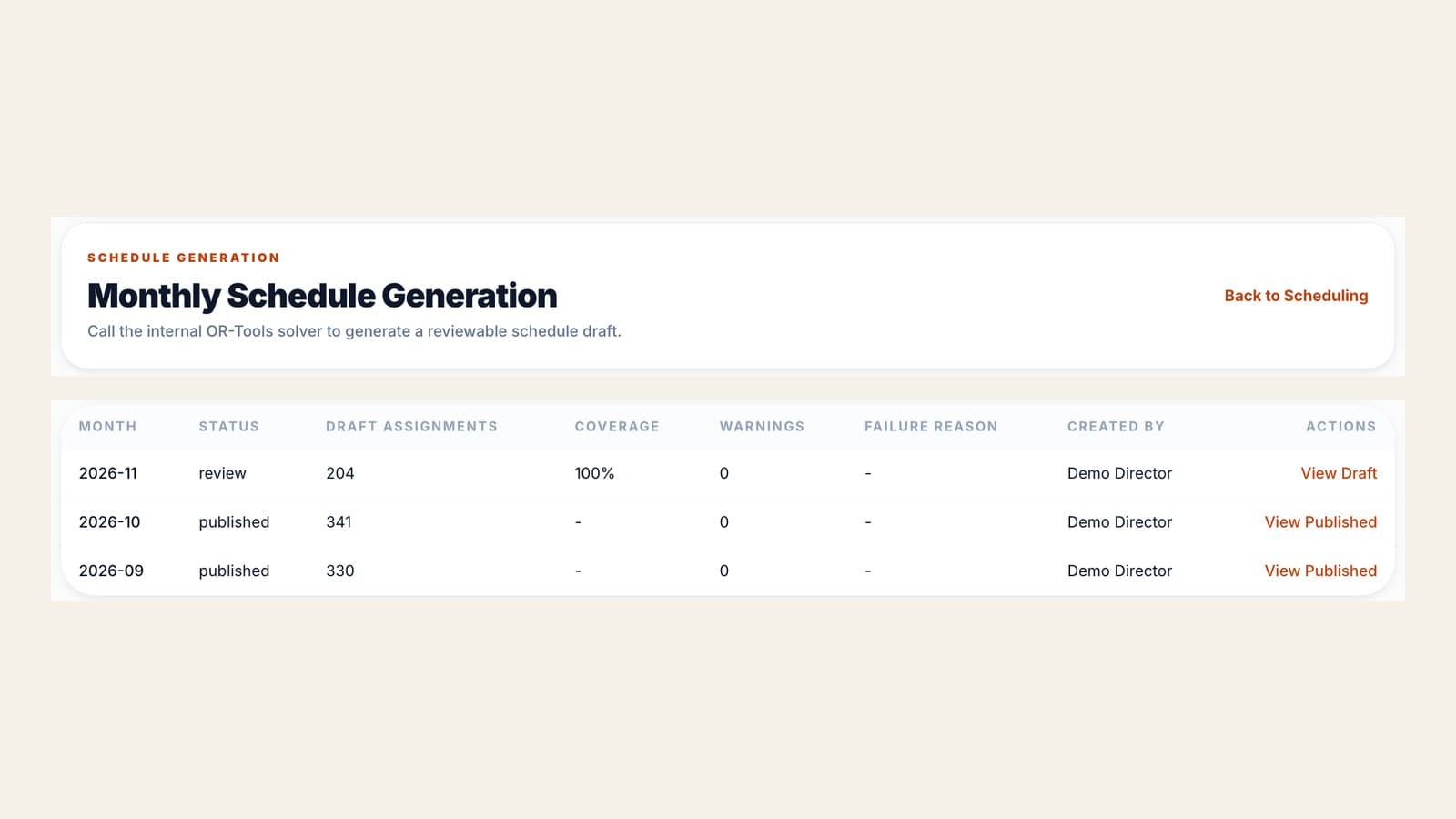
When there are simply not enough eligible people, it says so instead of forcing a roster that cannot work.
Checks before anything is published
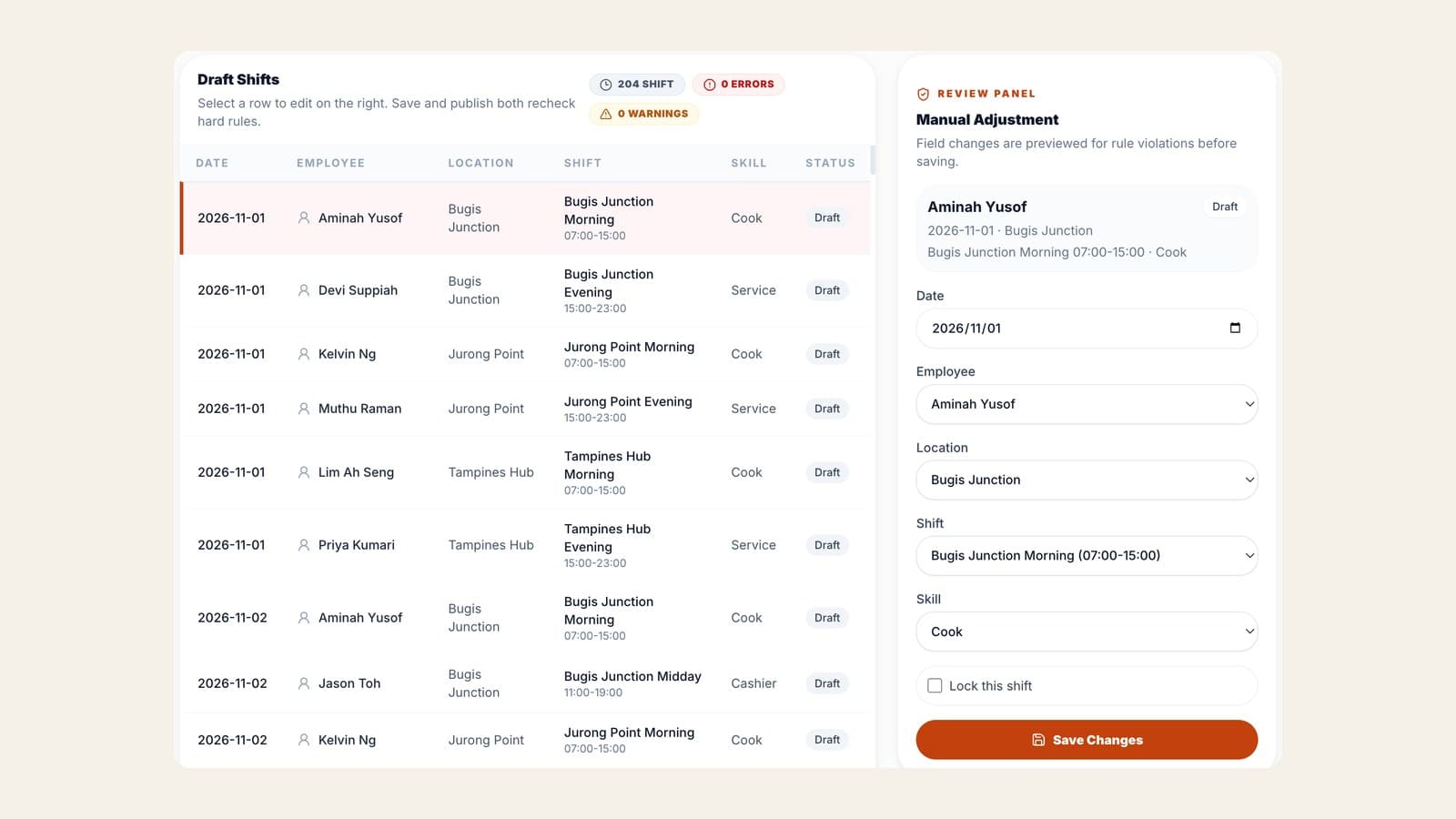
You can adjust any shift in the draft. Saving and publishing both re-run the checks, and any hard-rule error blocks publishing:
- The employee does not have the skill for that role
- The same person is booked on overlapping shifts, including overnight ones
- The employee has approved leave that day
- A role is below its minimum headcount
- A full-timer has fewer rest days in the month than their scheme requires
- A weekend-off employee works a weekend with no weekday off in the same week
- A part-timer is put on a full-day shift
Other situations are flagged as warnings without blocking: working at an outlet that is not their home outlet, covering with a secondary skill, and working a public holiday (with a reminder that a day off in lieu is due).
Staff see their roster on their phone
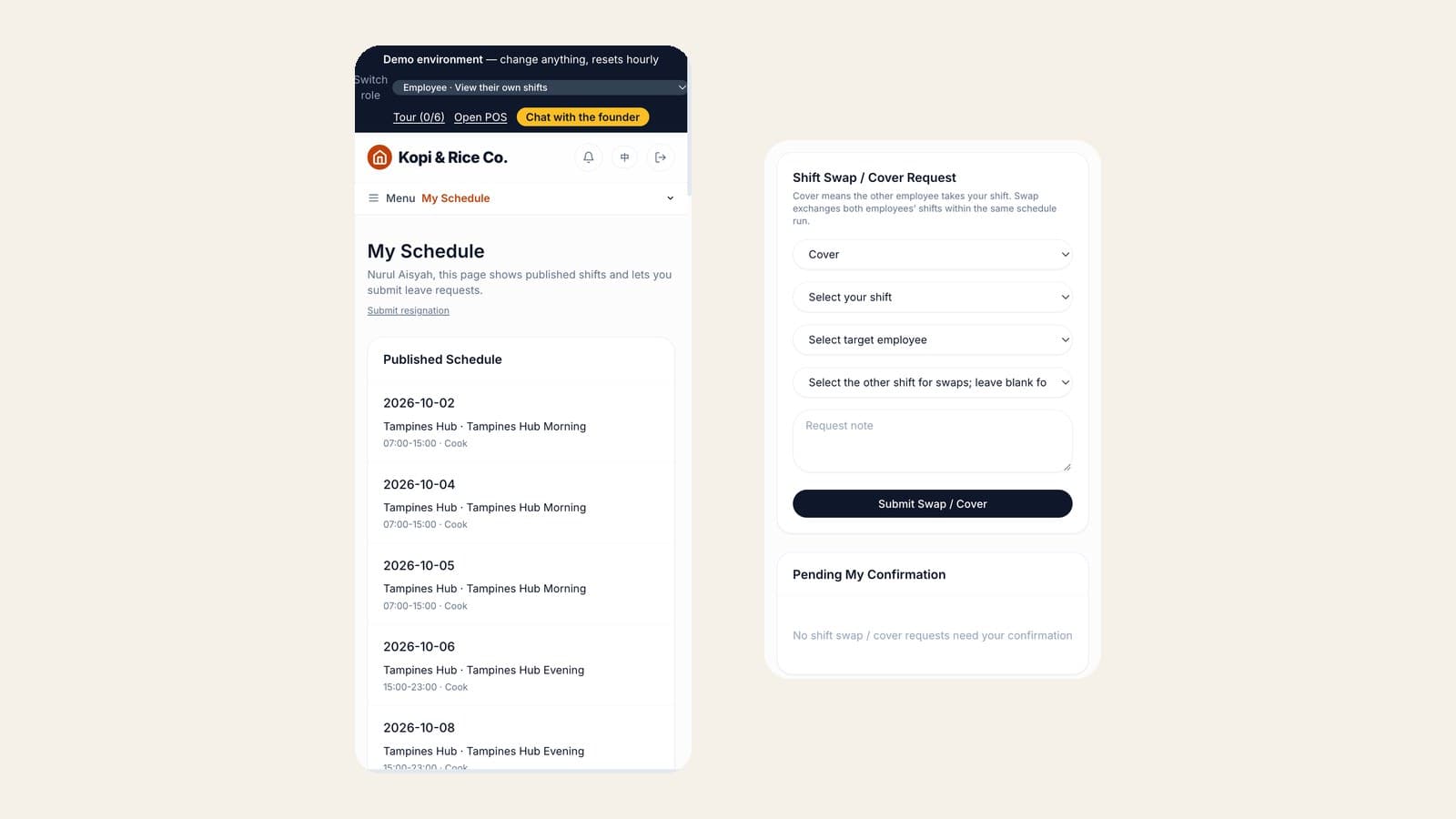
Once the roster is published, each employee signs in and sees My Schedule on their phone. From the same page they can request leave and ask for a shift swap or cover. A swap goes to the other person to confirm, then to a manager, and the hard rules are checked again before approval so the swap cannot create a clash. Store managers get a read-only view of their outlet's published roster, and the roster can be exported to Excel or printed.
What it does not do
- It does not calculate pay, overtime pay or CPF, and it does not decide which employees are covered by PWM or Part 4.
- Its checks enforce the rules you set up: skills, rest-day schemes, part-time caps and headcount. They are not a legal compliance review. Weekly hour and monthly overtime limits are not checked automatically today, so set shift lengths and rest-day schemes to match your contracts and MOM's rules, and give the roster a final look before you publish.
Summary
- The Employment Act sets hours, overtime, rest days and public holidays for most restaurant staff. PWM sets wage floors for local staff at firms that employ foreign workers, and they rise each July to 2028.
- Run the same checklist on every roster: skills, double booking, leave, headcount, rest days, hours, part-time caps, public holidays and post-publish changes.
- When you compare tools, ask what blocks publishing, how it handles several outlets, and what it does not do.
You can try scheduling yourself in the MakanCloud demo. Sign in as the Director to open Human resources → Scheduling, then switch to the Employee role to see the roster on a phone. No call needed.
Plans and what each includes are on the pricing page. If you would rather talk through your own outlets, message us on WhatsApp at +65 9782 6954.
Related articles
- QR Ordering Update: Sold-Out Dishes, Waiter Calls and Pickup NumbersMakanCloud's QR ordering now has optional settings for sold-out dishes, English dish details and allergens, per-dish notes, calling a waiter, party size, menu banners, counter pickup numbers, order progress and e-receipts. Everything is off or empty by default. Here is what each one does and where to switch it on.
- How to Open a Second Restaurant Outlet in Singapore: The Operating SideA practical checklist for Singapore F&B owners opening a second outlet: what to write down before you leave the first one, how to keep dishes the same, who runs which outlet, how stock moves between them, and how to read two outlets' numbers side by side.
- How Outlets Order from a Central Kitchen: Cut-off Times, Par Levels and ReceivingA practical guide for Singapore restaurant chains: how to set an ordering cut-off that works backwards from production, how to calculate par levels per outlet, how to receive against the order, and the month-end review that keeps it honest.
Curious how MakanCloud would fit your outlets?
14-day free trial, no credit card required — or book a 15-minute demo and we’ll walk through your setup directly.